

In this article, Mark Hodges, Timetabling Director at SchoolPro Curriculum Ltd, shares his insight into the main timetable software options available to UK schools, how they compare and what schools should consider when choosing the right solution.
One of the questions I’m asked most by heads, deputies and business managers is which timetable software they should use. The short answer is that for most UK schools it comes down to four products, and the biggest factor in choosing between them is your MIS.
This post sets out what’s available, why schools change, and where the products differ.
Two Types of Timetable Software
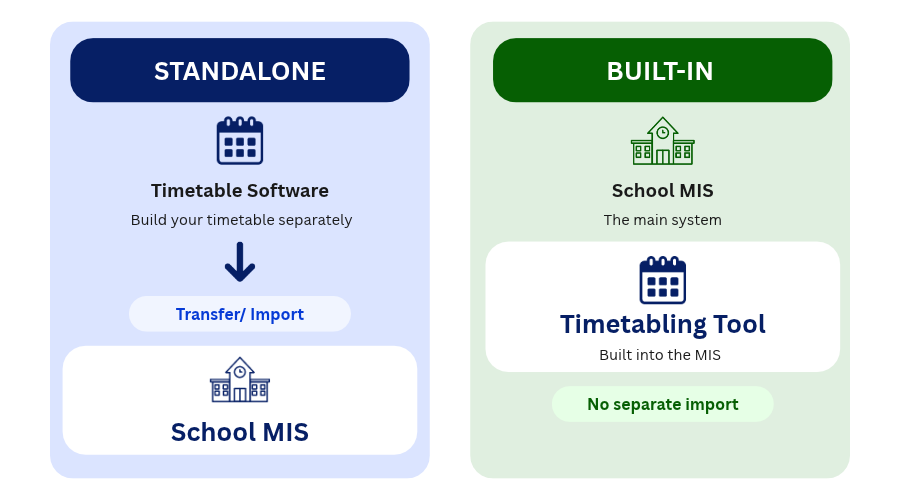
Standalone tools sit outside your MIS. You build the timetable in them, then send it into the MIS. Most work with more than one MIS, so they can move with you if you change.
Built-in tools sit inside the MIS. There’s no import step, but you can only use them with that MIS.
Why Schools Change Timetable Software
Most schools don’t change timetable software because they’re unhappy with it. They change because something else has changed. The common reasons I see are:
- A change of MIS. This is the big one. Not every timetable product links to every MIS, so moving MIS can force a move.
- The timetabler leaves. If one person held all the knowledge, the school sometimes uses the moment to pick something easier for the next person to learn.
- Wanting fewer systems. Some schools would rather build the timetable inside the MIS than keep two systems in step.
- The curriculum has outgrown the software. More options blocks, a new sixth form or a second site can expose the limits of a product.
The Main Products
Nova T6
Many UK secondaries build their timetable in Nova T6, which is now owned by Parent Pay Group (PPG). It was built to work closely with SIMS, and Bromcom has an official route for importing a Nova T6 timetable. It can schedule automatically or by hand, and it has a wide range of reports, for example on contact time and how well rooms are used.
What sets it apart is a gap rather than a feature: Arbor does not link directly to Nova T6. Arbor tells schools moving to it to switch to TimeTabler or Edval. If your school or trust is thinking about Arbor, plan for new timetable software as part of that move.
Edval (now Tes Timetable)
Edval is a standalone product, now sold by Tes as Tes Timetable. It has direct links to SIMS, Arbor and Bromcom, and it is one of the two timetable products Arbor points schools to. It builds options blocks as well as the timetable.
Tes is rebuilding it as Timetable 2.0, a cloud-based version. The first version, Essentials, is aimed at single-site schools with straightforward timetables, with a version for more complex timetables to follow. If you’re looking at it, ask which version you would get. With Arbor, changes are made in Edval and the timetable is then re-imported, rather than edited in both places.
Bromcom wTimetable
wTimetable is built into the Bromcom MIS and was launched in 2024. Because it’s part of the MIS, there’s no separate software and no import step. You can keep several versions of the timetable while you model changes, schedule by hand or automatically, and it flags clashes and gaps as you go.
The obvious limit is that it’s only available to Bromcom schools. It’s also a newer product, so it’s worth asking what is still on the roadmap. (For transparency, I’ve done paid work for Bromcom, including a review of wTimetable.)
Other products you may come across
- Griddle is Compass’s own cloud-based timetabling, which syncs with Compass MIS. It’s mainly relevant if your school or trust is moving to Compass.
- aSc Timetables. This is a standalone product which is good for less complex timetables. It does not import into the main MIS systems easily but does give good print outs if the timetable doesn’t have to be in the MIS.
- Lantiv. Timetabling Turbo is a Windows desktop application by Lantiv designed to build, optimize, and manage school and college timetables. It combines an automated scheduling engine with manual drag-and-drop tools in a single workspace. Again this program does not integrate easily with the main MIS systems.
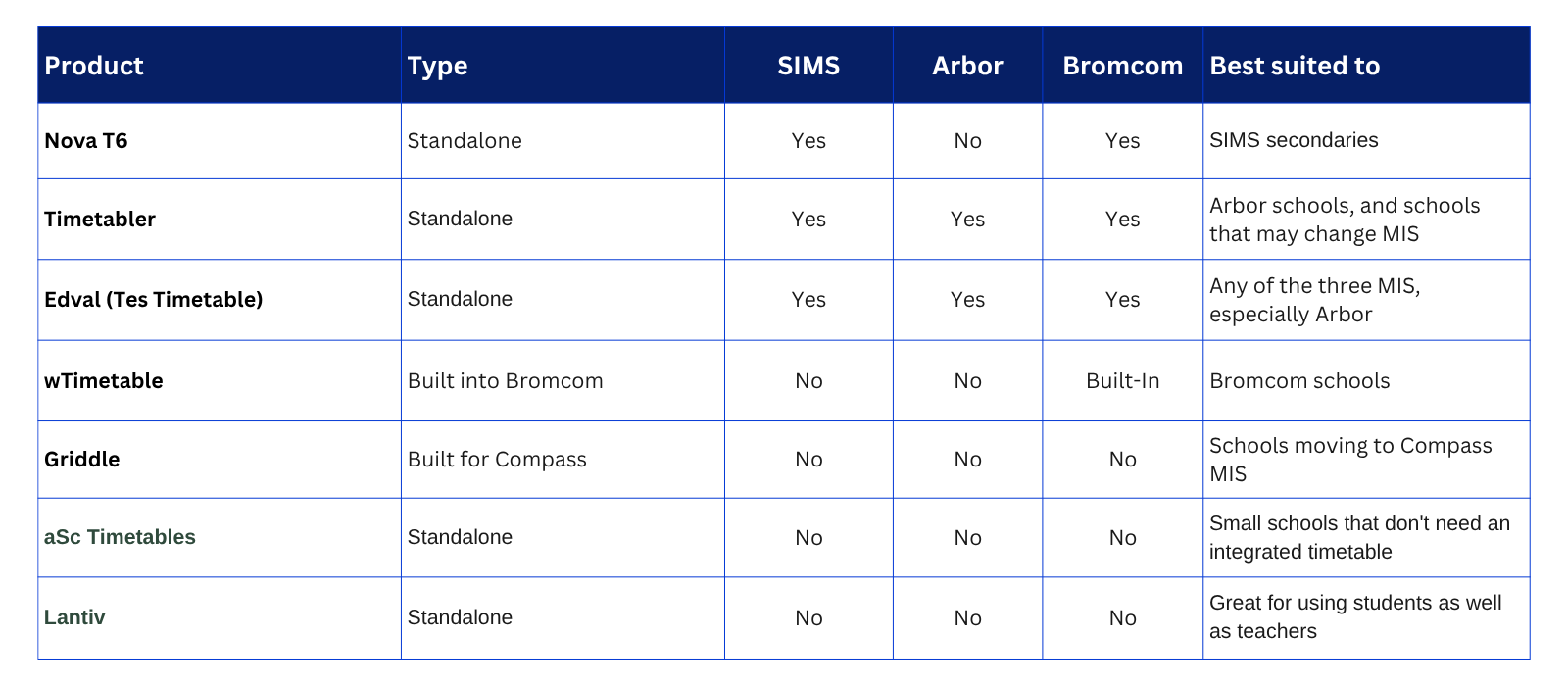
How They Compare on MIS Links
“Yes” means an official link to that MIS. Check the details with each supplier for your own set-up.
Where the Features Differ
Most of these products will build a good timetable in the right hands. The differences that matter day to day tend to be these:
- Which MIS it links to. Check this first. It rules products in or out faster than anything else.
- Whether changes flow both ways. Timetables change during the year. TimeTabler and Arbor can send changes back and forth; with other combinations you may be updating one system and re-importing.
- Built in or separate. wTimetable removes the import step for Bromcom schools. Standalone tools give you more freedom to change MIS later.
- Options blocks. TimeTabler has a linked Options program, Edval builds blocks itself, and Nova T6 sits alongside the SIMS options tools. Look at how each handles your own blocks.
- Cloud or installed. wTimetable, Griddle and Tes Timetable 2.0 run in a web browser. Check how the others are installed and whether more than one person can work on the timetable at once.
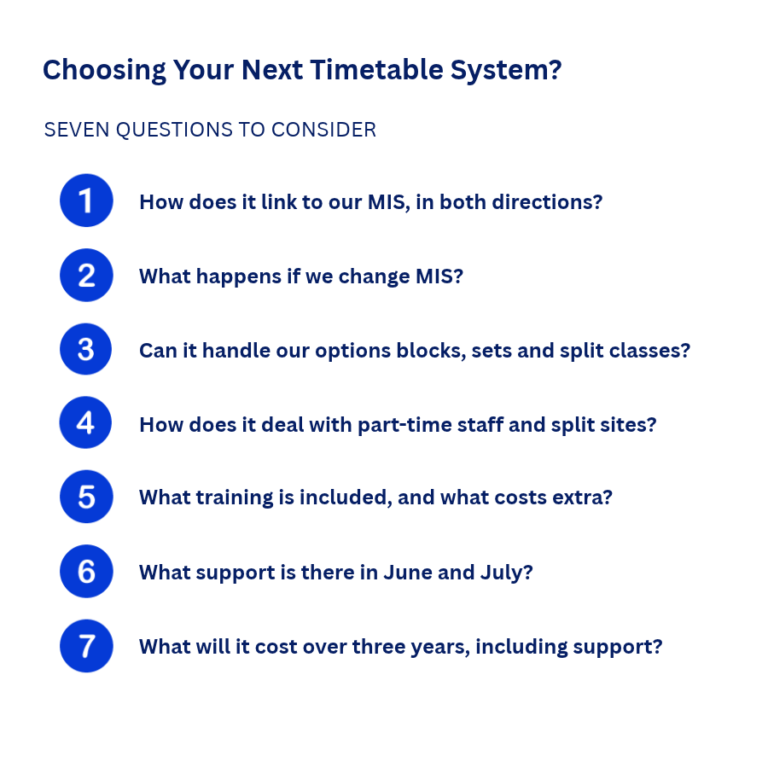
If you do decide to change, give yourself a year: decide in the autumn term, train and test in the spring, and build next year’s timetable in the summer. If you’re changing MIS as well, plan both together.
And if you’d like to talk through your own school’s situation, please do get in touch.